
Southside Elm City6.23.8 - App Store
You'll be able to see results in few seconds.
Publisher Description


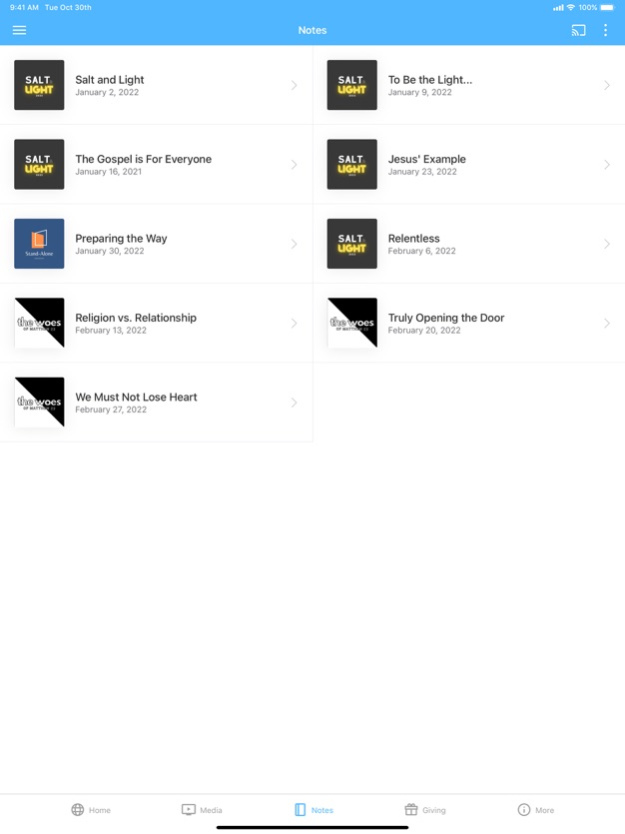
This app is packed with powerful content and resources to help you grow and stay connected with Southside Baptist Church. With this app you can:
- Watch or listen to past messages
- Stay up to date with events
- Download messages for offline listening
- Share your favorite messages via Twitter, Facebook, or email
- Stay up to date with push notifications
- Give online
Mobile app version: 6.23.8
Version History What's new
- Group managers can set a Group Member Limit so groups automatically show as Full in the Group Finder when member limit is reached.
Improvement
- Bug fixes and general performance improvements. 6.23.8 Sep 29 Misc media improvements 6.10.3 05/21/2024 - Bug fixes and performance improvements 6.2.0 05/14/2023 - Bug fixes and performance improvements
- Media improvements 6.1.1 02/16/2023 Misc. bug fixes and improvements. 5.19.0 04/17/2022 Misc. bug fixes and improvements. 5.18.2 03/02/2022 * Looking for messages on a specific topic? Introducing media search!
* Optimized for iPhone X
* A new and improved experience for reconnecting if the app is offline
* Fresh new layout for the Inbox 4.9.5 03/30/2018 New in 4.8.1
- UI improvements
New in 4.7.0
Note-taking is here! Jot down your thoughts on-the-go, directly in the app. You can create a note via the app menu, or by tapping the “Take a Note” button on media in the app. Your notes will sync across devices, so you never have to worry about losing your notes when you get a new phone or tablet.
You can easily browse previous notes you’ve taken from the app menu, and you can also share your notes with a friend!
We hope you love the new note feature. Try it out today!
New in 4.6.0
- Playing audio and video is now a combined experience!
- Seamlessly switch between audio and video by tapping the action menu (3 vertical dots icon)
- Continue listening to a video while navigating through the app
- Quickly access downloads from the app menu
- Track the remaining time for your downloads 4.8.1 12/08/2017 New in 4.7.0
Note-taking is here! Jot down your thoughts on-the-go, directly in the app. You can create a note via the app menu, or by tapping the “Take a Note” button on media in the app. Your notes will sync across devices, so you never have to worry about losing your notes when you get a new phone or tablet.
You can easily browse previous notes you’ve taken from the app menu, and you can also share your notes with a friend!
We hope you love the new note feature. Try it out today!
New in 4.6.0
- Playing audio and video is now a combined experience!
- Seamlessly switch between audio and video by tapping the action menu (3 vertical dots icon)
- Continue listening to a video while navigating through the app
- Quickly access downloads from the app menu
- Track the remaining time for your downloads 4.7.0 10/03/2017 4.6.1 07/20/2017
About Southside Elm City
The company that develops Southside Elm City is Southside Baptist Church (Elm City). The latest version released by its developer is 6.23.8.
To install Southside Elm City on your iOS device, just click the green Continue To App button above to start the installation process. The app is listed on our website since 2026-10-14 and was downloaded 0 times. We have already checked if the download link is safe, however for your own protection we recommend that you scan the downloaded app with your antivirus. Your antivirus may detect the Southside Elm City as malware if the download link is broken.
How to install Southside Elm City on your iOS device:
- Click on the Continue To App button on our website. This will redirect you to the App Store.
- Once the Southside Elm City is shown in the iTunes listing of your iOS device, you can start its download and installation. Tap on the GET button to the right of the app to start downloading it.
- If you are not logged-in the iOS appstore app, you'll be prompted for your your Apple ID and/or password.
- After Southside Elm City is downloaded, you'll see an INSTALL button to the right. Tap on it to start the actual installation of the iOS app.
- Once installation is finished you can tap on the OPEN button to start it. Its icon will also be added to your device home screen.
Program Details
System requirements
Download information
Pricing
Version History
version 6.23.8
posted on 2026-10-14
Version History What's new
- Group managers can set a Group Member Limit so groups automatically show as Full in the Group Finder when member limit is reached.
Improvement
- Bug fixes and general performance improvements. 6.23.8 Sep 29 Misc media improvements 6.10.3 05/21/2024 - Bug fixes and performance improvements 6.2.0 05/14/2023 - Bug fixes and performance improvements
- Media improvements 6.1.1 02/16/2023 Misc. bug fixes and improvements. 5.19.0 04/17/2022 Misc. bug fixes and improvements. 5.18.2 03/02/2022 * Looking for messages on a specific topic? Introducing media search!
* Optimized for iPhone X
* A new and improved experience for reconnecting if the app is offline
* Fresh new layout for the Inbox 4.9.5 03/30/2018 New in 4.8.1
- UI improvements
New in 4.7.0
Note-taking is here! Jot down your thoughts on-the-go, directly in the app. You can create a note via the app menu, or by tapping the “Take a Note” button on media in the app. Your notes will sync across devices, so you never have to worry about losing your notes when you get a new phone or tablet.
You can easily browse previous notes you’ve taken from the app menu, and you can also share your notes with a friend!
We hope you love the new note feature. Try it out today!
New in 4.6.0
- Playing audio and video is now a combined experience!
- Seamlessly switch between audio and video by tapping the action menu (3 vertical dots icon)
- Continue listening to a video while navigating through the app
- Quickly access downloads from the app menu
- Track the remaining time for your downloads 4.8.1 12/08/2017 New in 4.7.0
Note-taking is here! Jot down your thoughts on-the-go, directly in the app. You can create a note via the app menu, or by tapping the “Take a Note” button on media in the app. Your notes will sync across devices, so you never have to worry about losing your notes when you get a new phone or tablet.
You can easily browse previous notes you’ve taken from the app menu, and you can also share your notes with a friend!
We hope you love the new note feature. Try it out today!
New in 4.6.0
- Playing audio and video is now a combined experience!
- Seamlessly switch between audio and video by tapping the action menu (3 vertical dots icon)
- Continue listening to a video while navigating through the app
- Quickly access downloads from the app menu
- Track the remaining time for your downloads 4.7.0 10/03/2017 4.6.1 07/20/2017
version 6.23.8
posted on 2026-10-03
Version History What's new
- Group managers can set a Group Member Limit so groups automatically show as Full in the Group Finder when member limit is reached.
Improvement
- Bug fixes and general performance improvements. 6.23.8 3d ago Misc media improvements 6.10.3 05/21/2024 - Bug fixes and performance improvements 6.2.0 05/14/2023 - Bug fixes and performance improvements
- Media improvements 6.1.1 02/16/2023 Misc. bug fixes and improvements. 5.19.0 04/17/2022 Misc. bug fixes and improvements. 5.18.2 03/02/2022 * Looking for messages on a specific topic? Introducing media search!
* Optimized for iPhone X
* A new and improved experience for reconnecting if the app is offline
* Fresh new layout for the Inbox 4.9.5 03/30/2018 New in 4.8.1
- UI improvements
New in 4.7.0
Note-taking is here! Jot down your thoughts on-the-go, directly in the app. You can create a note via the app menu, or by tapping the “Take a Note” button on media in the app. Your notes will sync across devices, so you never have to worry about losing your notes when you get a new phone or tablet.
You can easily browse previous notes you’ve taken from the app menu, and you can also share your notes with a friend!
We hope you love the new note feature. Try it out today!
New in 4.6.0
- Playing audio and video is now a combined experience!
- Seamlessly switch between audio and video by tapping the action menu (3 vertical dots icon)
- Continue listening to a video while navigating through the app
- Quickly access downloads from the app menu
- Track the remaining time for your downloads 4.8.1 12/08/2017 New in 4.7.0
Note-taking is here! Jot down your thoughts on-the-go, directly in the app. You can create a note via the app menu, or by tapping the “Take a Note” button on media in the app. Your notes will sync across devices, so you never have to worry about losing your notes when you get a new phone or tablet.
You can easily browse previous notes you’ve taken from the app menu, and you can also share your notes with a friend!
We hope you love the new note feature. Try it out today!
New in 4.6.0
- Playing audio and video is now a combined experience!
- Seamlessly switch between audio and video by tapping the action menu (3 vertical dots icon)
- Continue listening to a video while navigating through the app
- Quickly access downloads from the app menu
- Track the remaining time for your downloads 4.7.0 10/03/2017 4.6.1 07/20/2017
version 6.10.3
posted on 2026-09-26
Version History Misc media improvements 6.10.3 05/21/2024 - Bug fixes and performance improvements 6.2.0 05/14/2023 - Bug fixes and performance improvements
- Media improvements 6.1.1 02/16/2023 Misc. bug fixes and improvements. 5.19.0 04/17/2022 Misc. bug fixes and improvements. 5.18.2 03/02/2022 * Looking for messages on a specific topic? Introducing media search!
* Optimized for iPhone X
* A new and improved experience for reconnecting if the app is offline
* Fresh new layout for the Inbox 4.9.5 03/30/2018 New in 4.8.1
- UI improvements
New in 4.7.0
Note-taking is here! Jot down your thoughts on-the-go, directly in the app. You can create a note via the app menu, or by tapping the “Take a Note” button on media in the app. Your notes will sync across devices, so you never have to worry about losing your notes when you get a new phone or tablet.
You can easily browse previous notes you’ve taken from the app menu, and you can also share your notes with a friend!
We hope you love the new note feature. Try it out today!
New in 4.6.0
- Playing audio and video is now a combined experience!
- Seamlessly switch between audio and video by tapping the action menu (3 vertical dots icon)
- Continue listening to a video while navigating through the app
- Quickly access downloads from the app menu
- Track the remaining time for your downloads 4.8.1 12/08/2017 New in 4.7.0
Note-taking is here! Jot down your thoughts on-the-go, directly in the app. You can create a note via the app menu, or by tapping the “Take a Note” button on media in the app. Your notes will sync across devices, so you never have to worry about losing your notes when you get a new phone or tablet.
You can easily browse previous notes you’ve taken from the app menu, and you can also share your notes with a friend!
We hope you love the new note feature. Try it out today!
New in 4.6.0
- Playing audio and video is now a combined experience!
- Seamlessly switch between audio and video by tapping the action menu (3 vertical dots icon)
- Continue listening to a video while navigating through the app
- Quickly access downloads from the app menu
- Track the remaining time for your downloads 4.7.0 10/03/2017 4.6.1 07/20/2017
version 6.10.3
posted on 2026-09-04
Version History Misc media improvements 6.10.3 05/21/2024 - Bug fixes and performance improvements 6.2.0 05/14/2023 - Bug fixes and performance improvements
- Media improvements 6.1.1 02/16/2023 Misc. bug fixes and improvements. 5.19.0 04/17/2022 Misc. bug fixes and improvements. 5.18.2 03/02/2022 This app has been updated by Apple to prepare for watchOS 27 compatibility. No new features are included.
* Looking for messages on a specific topic? Introducing media search!
* Optimized for iPhone X
* A new and improved experience for reconnecting if the app is offline
* Fresh new layout for the Inbox 4.9.5 03/30/2018 New in 4.8.1
- UI improvements
New in 4.7.0
Note-taking is here! Jot down your thoughts on-the-go, directly in the app. You can create a note via the app menu, or by tapping the “Take a Note” button on media in the app. Your notes will sync across devices, so you never have to worry about losing your notes when you get a new phone or tablet.
You can easily browse previous notes you’ve taken from the app menu, and you can also share your notes with a friend!
We hope you love the new note feature. Try it out today!
New in 4.6.0
- Playing audio and video is now a combined experience!
- Seamlessly switch between audio and video by tapping the action menu (3 vertical dots icon)
- Continue listening to a video while navigating through the app
- Quickly access downloads from the app menu
- Track the remaining time for your downloads 4.8.1 12/08/2017 New in 4.7.0
Note-taking is here! Jot down your thoughts on-the-go, directly in the app. You can create a note via the app menu, or by tapping the “Take a Note” button on media in the app. Your notes will sync across devices, so you never have to worry about losing your notes when you get a new phone or tablet.
You can easily browse previous notes you’ve taken from the app menu, and you can also share your notes with a friend!
We hope you love the new note feature. Try it out today!
New in 4.6.0
- Playing audio and video is now a combined experience!
- Seamlessly switch between audio and video by tapping the action menu (3 vertical dots icon)
- Continue listening to a video while navigating through the app
- Quickly access downloads from the app menu
- Track the remaining time for your downloads 4.7.0 10/03/2017 4.6.1 07/20/2017
version 6.10.3
posted on 2026-08-23
Version History Misc media improvements 6.10.3 05/21/2024 - Bug fixes and performance improvements 6.2.0 05/14/2023 - Bug fixes and performance improvements
- Media improvements 6.1.1 02/16/2023 Misc. bug fixes and improvements. 5.19.0 04/17/2022 Misc. bug fixes and improvements. 5.18.2 03/02/2022 This update from Apple will improve the functionality of this app. No new features are included.
* Looking for messages on a specific topic? Introducing media search!
* Optimized for iPhone X
* A new and improved experience for reconnecting if the app is offline
* Fresh new layout for the Inbox 4.9.5 03/30/2018 New in 4.8.1
- UI improvements
New in 4.7.0
Note-taking is here! Jot down your thoughts on-the-go, directly in the app. You can create a note via the app menu, or by tapping the “Take a Note” button on media in the app. Your notes will sync across devices, so you never have to worry about losing your notes when you get a new phone or tablet.
You can easily browse previous notes you’ve taken from the app menu, and you can also share your notes with a friend!
We hope you love the new note feature. Try it out today!
New in 4.6.0
- Playing audio and video is now a combined experience!
- Seamlessly switch between audio and video by tapping the action menu (3 vertical dots icon)
- Continue listening to a video while navigating through the app
- Quickly access downloads from the app menu
- Track the remaining time for your downloads 4.8.1 12/08/2017 New in 4.7.0
Note-taking is here! Jot down your thoughts on-the-go, directly in the app. You can create a note via the app menu, or by tapping the “Take a Note” button on media in the app. Your notes will sync across devices, so you never have to worry about losing your notes when you get a new phone or tablet.
You can easily browse previous notes you’ve taken from the app menu, and you can also share your notes with a friend!
We hope you love the new note feature. Try it out today!
New in 4.6.0
- Playing audio and video is now a combined experience!
- Seamlessly switch between audio and video by tapping the action menu (3 vertical dots icon)
- Continue listening to a video while navigating through the app
- Quickly access downloads from the app menu
- Track the remaining time for your downloads 4.7.0 10/03/2017 4.6.1 07/20/2017
version 6.10.3
posted on 2024-05-21
Misc media improvements
version 6.10.3
posted on 2024-05-21
May 21, 2024
Version 6.10.3
Misc media improvements
version 6.2.0
posted on 2023-05-14
May 14, 2023
Version 6.2.0
- Bug fixes and performance improvements
Disclaimer
Official App Store Link
We do not host Southside Elm City on our servers. We did not scan it for viruses, adware, spyware or other type of malware. This app is hosted by Apple and passed their terms and conditions to be listed there. We recommend caution when installing it.
The App Store link for Southside Elm City is provided to you by apps112.com without any warranties, representations or guarantees of any kind, so access it at your own risk.
If you have questions regarding this particular app contact the publisher directly. For questions about the functionalities of apps112.com contact us.
